eBike Buyer’s Guide • Updated 2026
Best Cycling Computers for eBikes in 2026 🚴♂️⚡
A friendly, no-nonsense guide to picking the right GPS head unit for your electric bike — battery info, smart maps, training data, and zero confusing jargon.
Why Your eBike Deserves a Smart Computer
Let’s be honest. Your eBike is a serious investment. You wouldn’t drive a new car without a dashboard, right? So why ride a powerful electric bike using just guesswork for your battery range, speed, and route?
That’s where a cycling computer for eBikes changes everything. Check price on Amazon and you’ll see options ranging from $150 to over $700. But which ones actually talk to your eBike’s motor? Which ones show you battery percentage, assist mode, and remaining range — not just speed and distance?
This guide cuts through the noise. We’ll walk through the 8 best cycling computers for eBikes in 2026, explain exactly what to look for, share tips from real riders, and help you avoid the most common (and expensive) mistakes. By the end, you’ll know exactly which head unit fits your bike, your budget, and your riding style.
⚡ Quick Answer
Garmin Edge 130 Plus — Top-Rated GPS Computer
The top-selling GPS cycling computer on Amazon. Lightweight, GPS, maps, and ANT+ sensors.
ILM DOT-Certified Half Helmet
eBike riders share roads with cars. A DOT-certified helmet is essential at speed.
U-Lock + Security Cable
eBikes are expensive theft targets. 10mm hardened steel U-lock keeps yours safe.
The Garmin Edge 1050 is the best overall cycling computer for eBikes in 2026 — it shows live battery %, assist mode, and range for ANT+ LEV bikes (including Bosch, Shimano STEPS, and many others). For tighter budgets, the Garmin Edge Explore 2 is the smartest pick for everyday eBike riders, and the Wahoo Elemnt Bolt V3 wins for ease of use.
1. What Is an eBike Cycling Computer? 🤔
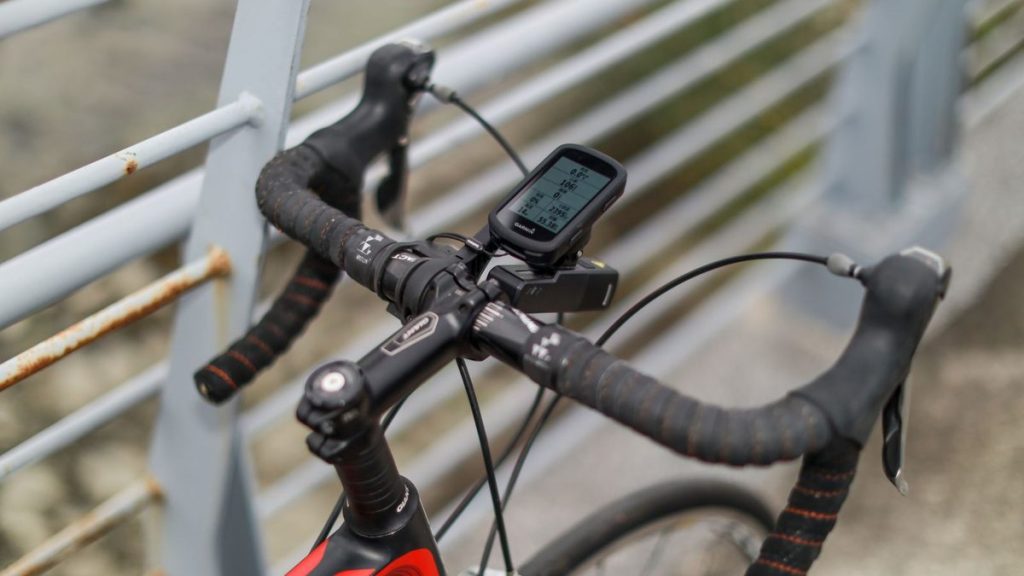
A cycling computer is basically a small, smart screen that lives on your handlebars. Think of it as your bike’s dashboard. It uses GPS satellites to track where you go, how fast, how far, and how high. Pretty cool, right?
But here’s where it gets interesting for eBike riders. A regular bike computer just shows speed and distance. An eBike-friendly computer connects directly to your motor and battery. That means you can see, in real time:
- 🔋 Battery percentage — no more guessing if you’ll make it home
- ⚡ Assist mode — Eco, Tour, Sport, Turbo (or whatever your motor calls them)
- 📏 Estimated range — how many more miles you have left
- 💪 Motor power output — what your motor is actually doing
- 🛣️ Turn-by-turn maps — beautiful color routing, not just a tiny arrow
This works through a wireless standard called ANT+ LEV (Light Electric Vehicle). Most major eBike systems support it — Bosch, Shimano STEPS, Yamaha, Brose, Mahle, Fazua, and many more. If your bike has one of these motors, the right computer will pair with it in seconds.
For a deeper look at how connected mobility tech works on smaller rides, check out our electric scooter buying guide — many of the same connectivity ideas apply.
2. How to Choose the Right Cycling Computer for Your eBike 🎯
Not every cycling computer fits every rider. Before you spend money, think through these five things. They make the difference between a computer you love and one that ends up in a drawer.
✅ 1. eBike Compatibility (the most important part)
Look for ANT+ LEV support. This is the magic ingredient. Without it, your computer can’t read your motor data. Almost every modern eBike with a Bosch, Shimano STEPS, Yamaha, or Brose motor uses ANT+ LEV. Some Specialized and Giant eBikes have their own apps too — check your owner’s manual.
✅ 2. Screen Size and Brightness
Bigger screens (3 to 3.8 inches) make maps easy to read at a glance. But they also weigh more and cost more. If you mostly ride for fitness, a 2.6-inch screen is plenty. If you’re touring or doing long bikepacking trips, go bigger. Touchscreens are nicer, but buttons still work better with thick winter gloves.
✅ 3. Battery Life
Most eBike riders don’t need 60 hours of battery life. A 15–20 hour rating covers about a week of normal riding. But if you tour or do all-day adventures, look at the COROS Dura (120 hours!) or any Garmin Solar version.
✅ 4. Maps and Navigation
Free preloaded maps are now standard on Garmin, Wahoo, and Hammerhead. Look for turn-by-turn directions with clear voice-style alerts. Hammerhead Karoo wins on map looks. Garmin wins on rerouting smarts.
✅ 5. Safety Features
Incident detection (auto-text to your emergency contact if you crash) is a huge deal for eBikers. Garmin Edge models lead here. Pair your computer with a Garmin Varia rear radar for extra peace of mind on roads.
⚠️ Watch out: Some cheap “GPS bike computers” on Amazon claim eBike compatibility but don’t actually support ANT+ LEV. Always check the spec sheet for “ANT+ LEV” or “eBike Connect” before buying.
3. Quick Comparison Table 📊
Here’s a side-by-side look at the 8 best cycling computers for eBikes in 2026. Prices are approximate US street prices and may shift during sales.
| Model | Screen | Battery | eBike Data | Price (USD) | Best For |
|---|---|---|---|---|---|
| Garmin Edge 1050 | 3.5″ touch | ~20 hrs | ✅ Full | $700 | Power users |
| Garmin Edge 840 Solar | 2.6″ touch | Up to 60 hrs | ✅ Full | $550 | Long rides |
| Garmin Edge Explore 2 | 3.0″ touch | ~16 hrs | ✅ Full | $300 | Everyday eBike riders |
| Wahoo Elemnt Bolt V3 | 2.3″ color | ~15 hrs | ✅ Yes | $350 | Simplicity lovers |
| Wahoo Elemnt Ace | 3.8″ touch | ~30 hrs | ✅ Yes | $600 | Big-screen fans |
| Hammerhead Karoo 3 | 3.2″ touch | ~15 hrs | ✅ ANT+ LEV | $475 | Map lovers |
| Bryton Rider 750 | 2.8″ touch | ~20 hrs | ✅ Yes | $280 | Budget eBikers |
| COROS Dura Solar | 2.7″ color | 120 hrs (solar) | ⚠️ Limited | $249 | Bikepackers |
4. Top 8 Cycling Computers for eBikes in 2026 🏆
Now let’s get into the details. Each pick below explains why it works, who it’s best for, and what real eBike riders say about it.
1. Garmin Edge 1050 — Best Overall
The smartphone of bike computers. Big, bright, and built to last.
If money is no object, this is the one. The Garmin Edge 1050 has a stunning 3.5-inch color touchscreen that stays readable in bright sun. It connects to almost every eBike system on the market through ANT+ LEV, so you’ll see live battery %, assist mode, range, and motor power right on screen.
What makes it special for eBike riders? The maps. Turn-by-turn navigation is incredibly smooth, and it reroutes you in seconds if you go off course. Plus, it has a built-in speaker for voice alerts, group ride messaging, and even Garmin Pay so you can buy a coffee mid-ride. View on Amazon →
- Brightest, sharpest screen
- Full eBike data integration
- Built-in speaker + Garmin Pay
- Excellent maps
- Expensive
- Heavier (161g)
- Shorter battery than 840 Solar
👤 Best for: Serious eBike riders who want the absolute best screen and feature set, and who don’t mind paying for it.
2. Garmin Edge Explore 2 — Best for Everyday eBike Riders
Made with eBikes in mind. Friendly, simple, and fairly priced.
This one was practically designed for eBike commuters and casual riders. The Edge Explore 2 has a large, easy-to-read 3-inch touchscreen, full ANT+ LEV eBike support, and incident detection. It skips the heavy training metrics (no FTP tests, no VO2 max) and focuses on what most eBike riders actually need: great maps, battery info, and safety features.
It’s also the easiest Garmin to set up. You just turn it on and ride. See options on Amazon →
👤 Best for: Commuters and weekend riders who want eBike-specific features without the complexity (or price) of a flagship.
3. Garmin Edge 840 Solar — Best Battery Life
A workhorse with solar charging. Goes and goes and goes.
If you ride long days or worry about charging, the Edge 840 Solar is your friend. The solar glass on the screen adds extra runtime in sunny weather — up to 60 hours total. It packs every Garmin training feature, full ANT+ LEV eBike support, ClimbPro for big climbs, and a crisp 2.6-inch touchscreen with backup buttons.
Riders who do bikepacking trips love this unit. You can leave the charger at home for a 3–4 day trip if you ride mostly during daylight. Check price on Amazon
👤 Best for: Long-distance eBike tourers, bikepackers, and anyone who hates remembering to charge things.
4. Wahoo Elemnt Bolt V3 — Best Easy Setup
No menus to wrestle with. Just scan a QR code and ride.
Wahoo’s whole brand is about simplicity. The Bolt V3 has buttons (no fiddly touchscreen), a bright 2.3-inch color display, and an app that does all the setup work on your phone. Pair it once and you’re done. ANT+ LEV eBike data shows up clean and simple — battery, assist, and range are right there.
It’s the favorite of riders who don’t want to read a 100-page manual. View on Amazon
👤 Best for: Riders who want plug-and-play, glove-friendly buttons, and a clean interface.
5. Wahoo Elemnt Ace — Biggest Screen
A 3.8-inch giant with a built-in wind sensor. Yes, really.
The Elemnt Ace is the largest cycling computer you can buy. Its 3.8-inch touchscreen is a dream for showing maps, and it has a unique wind sensor that tells you exactly how much headwind you’re fighting. Battery lasts about 30 hours, and yes — full ANT+ LEV eBike support is included.
The catch? It’s heavy (208g) and big. Not everyone wants a small TV on their bars. See options on Amazon
👤 Best for: Riders with eyesight challenges, gravel adventurers, and tech fans who love big screens.
6. Hammerhead Karoo 3 — Best Maps
A smartphone-style experience that’s beautiful to look at.
Owned by SRAM, the Karoo 3 runs on Android, which makes its interface feel like a phone. The 3.2-inch screen has the sharpest resolution in this entire list, and the maps look gorgeous — vibrant, easy to follow, and full of detail. ANT+ LEV eBike support is built in.
One important note: if you have a Shimano Di2 drivetrain on a non-eBike, official support was removed. There’s a free community workaround (the Ki2 app) that adds it back, but if you’re not techy, this could feel awkward. For eBike-only data, you’re fine. Check price on Amazon
👤 Best for: Map nerds, gravel riders, and SRAM AXS users who want the prettiest screen.
7. Bryton Rider 750 — Best Affordable Pick
Premium features at a fraction of the price.
Bryton is the underdog brand that punches way above its weight. The Rider 750 has a 2.8-inch touchscreen, full ANT+ LEV eBike data, free maps, and turn-by-turn navigation — all for under $300. Battery life sits around 20 hours.
It’s not as polished as Garmin or Wahoo, but for the money, you’d struggle to do better. View on Amazon
👤 Best for: First-time buyers and value-focused eBike riders.
8. COROS Dura Solar — Best for Bikepacking
120 hours of battery life. That’s nearly a week of riding.
The COROS Dura is the new battery-life king. Its solar charging glass adds runtime as you ride, and the standard battery is huge. eBike data support is more limited compared to Garmin, but for adventurers who care more about going far than fancy data, it’s a winner.
Plus, at $249, it’s one of the most affordable serious cycling computers out there. See options on Amazon
👤 Best for: eBike tourers, off-grid riders, and anyone planning multi-day adventures.
📊 Feature Deep-Dive: Which One Wins What?
5. Common Mistakes (and How to Fix Them) ⚠️
Buying the wrong computer is frustrating — and expensive. Here are the five mistakes we see most often, with simple fixes for each.
Fix: Before you buy, search the product specs for “ANT+ LEV.” If it’s not there, the computer can’t read your eBike’s motor data. Also check your eBike’s manual for its supported protocols.
Fix: If you wear reading glasses, go for at least a 3-inch screen (Karoo 3, Edge Explore 2, or Edge 1050). Test in-store if you can.
Fix: Most premium computers come with an out-front mount. But your eBike’s display might already take up that space. Check first. Brands like K-Edge make adapters for almost any setup.
Fix: Don’t pay $700 for a 1050 if you just commute. The Explore 2 covers 90% of needs at less than half the cost.
Fix: Make sure your computer is rated IPX7 (waterproof for short submersion). Cheaper “splashproof” units can fail in real rain.
“The biggest upgrade I made on my eBike wasn’t a new battery — it was getting a computer that showed me my real remaining range. I stopped getting stranded at the worst spots.” — Sarah M., Reddit r/ebikes
6. Pro Tips From Real Riders 💡
We hung out in eBike forums, Reddit threads, and Strava clubs to gather these tips. They come straight from riders who’ve made the mistakes so you don’t have to.
A Garmin Varia rear radar warns you of approaching cars on your screen. It’s a game-changer for eBike commuters in traffic.
Most computers let you create a separate “eBike” page showing battery %, assist mode, range, and motor power. Make it your default screen.
Watch your motor power use in real time. Drop to Eco mode on flats and save Turbo for hills. Riders typically gain 20–30% more range this way.
All the computers in this guide upload your rides to Strava automatically. Komoot is brilliant for planning eBike-friendly routes that avoid huge climbs.
Wahoo’s app is the friendliest. Garmin Connect has the most depth. Hammerhead’s dashboard is web-based and sleek. Try the apps before you commit.
📱 Real Stories From Social Media
Here are three quick stories from real eBike riders that show how the right computer changes things:
- Mike, Trek Allant+ 7 owner: “Switched from a phone to a Garmin Edge 840 and saved 30% phone battery on every commute. Plus the maps are way better.”
- Lisa, Specialized Como SL rider: “The Wahoo Bolt V3 setup took me 4 minutes. I was riding within an hour. Easiest gadget I’ve ever bought.”
- James, Riese & Müller Charger4: “I bikepacked from London to Wales on the Karoo 3. The maps made me confident even on tiny lanes I’d never seen before.”
7. Frequently Asked Questions 🙋
Q1: Do I really need a cycling computer if my eBike has a built-in display?
Honestly? Yes, if you do anything more than short commutes. Built-in eBike displays show speed, battery %, and assist mode. A cycling computer adds maps, GPS routing, training data, safety features, and ride history. It’s a totally different tool.
Q2: Will my Bosch eBike work with these computers?
Yes! Bosch eBikes use ANT+ LEV, which is supported by all Garmin Edge models, Wahoo Elemnt computers, and the Hammerhead Karoo 3. You’ll see live battery, assist mode, and range data on your computer.
Q3: What about Shimano STEPS eBikes?
Shimano STEPS works perfectly with Garmin Edge models and Wahoo Elemnt computers via ANT+ LEV. The Hammerhead Karoo 3 also supports it through ANT+ LEV (the Di2 limitation is for non-eBike drivetrains, not motors).
Q4: Can I just use my phone instead?
You can — but a phone drains fast in cold or sun, doesn’t read your motor data over ANT+ LEV, and is harder to read at speed. A dedicated computer pays itself back in convenience and battery savings within a few months.
Q5: Are these computers waterproof?
All eight picks are rated IPX7, which means they survive heavy rain and short splashes. Don’t go swimming with them, but rainstorms? No problem.
Q6: How long do these computers last?
With normal care, you can expect 4–6 years of solid use. Software updates keep older units relevant. Garmin and Wahoo are particularly good about long-term support — many riders use 6-year-old units happily.
8. Final Buying Checklist ✅
Before you click that “Buy” button, run through this quick checklist. If you can tick all six boxes, you’ve found the right computer.
- ✅ Confirmed ANT+ LEV support for your eBike
- ✅ Screen size matches your eyesight and riding style
- ✅ Battery life covers your typical longest ride (with margin)
- ✅ IPX7 waterproof rating
- ✅ Mounts fit your handlebars (and don’t clash with your eBike’s display)
- ✅ Smartphone app feels easy to use
Ready to Pick Yours? 🚀
Most riders we surveyed were happy with their first computer for years. Just match your needs to the right model and you’ll love it.
#ad — Affiliate link. Shop with confidence.
Final Thoughts
A great cycling computer turns your eBike from a “fun ride” into a smarter, safer, more rewarding experience. Whether you’re commuting through city traffic, exploring backroads on weekends, or planning a multi-day adventure, the right head unit makes everything better.
If you only remember three things from this guide, make it these:
- Always check ANT+ LEV support before buying.
- Match your screen size to how you actually ride — bigger isn’t always better.
- The Garmin Edge Explore 2 covers 90% of eBike riders at a fair price.
Got more questions about eBike accessories, riding gear, or smart mobility? Browse our other guides on the best electric scooters, scooter safety tips, and our complete hoverboard buying guide. For deeper specs and brand-by-brand reviews, the team at BikeRadar and Cyclingnews publish excellent ongoing tests.
Whichever computer you pick, ride safe, ride often, and enjoy that smooth electric whoosh on every hill. 🚴♀️⚡
📅 Last updated: April 2026 • ✍️ Author: RC Blogs Editorial Team
As an Amazon Associate, we earn from qualifying purchases. All opinions are independent.