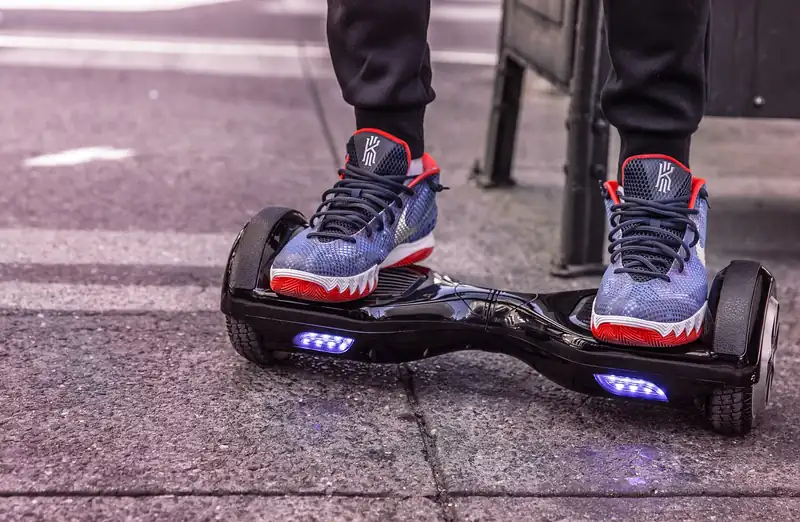
A budget board with LED lights and a Bluetooth speaker — but is it the right first ride? Here's the honest, research-backed rundown.
Welcome to our Hover-1 Matrix hoverboard review. If you’re shopping for a fun, affordable first hoverboard that won’t drain your wallet, the Matrix is probably already on your list. It’s one of the best-selling budget boards from Hover-1, and you’ll spot it at Amazon, Walmart, and Target for around $130 to $150 (often less on sale). For that money you get a self-balancing board with two 150-watt motors, a 7 mph top speed, glowing LED lights, and a built-in Bluetooth speaker.
That mix of low price and fun features makes it a favorite for birthdays and holidays. But a cheap price tag always raises the same question: is it actually any good, or is it a toy that dies in a month? We dug into the real specs, the fine print, and what owners say after months of riding.
In this review we’ll walk through exactly what the Matrix can do, who it’s built for, where it falls short, and how it stacks up against other Hover-1 boards. By the end you’ll know if it’s the right pick for your rider — or if you should spend a little more.
This article is part of our best hoverboards and reviews hub, which lists every hoverboard review on the site.
Hover-1 Matrix at a Glance
The Hover-1 Matrix is a budget hoverboard built for kids, teens, and first-time riders. It sits at the affordable end of the Hover-1 lineup, and it keeps things simple. You get two 150-watt motors, a top speed of 7 mph, a 3-mile range, and a handful of fun extras like color-changing lights and a Bluetooth speaker. Nothing here is high-performance, but nothing needs to be. This is a board for cruising the driveway, not racing down trails.
So who is it really for? The Matrix shines as a first hoverboard. It’s light, easy to balance on, and the 7 mph top speed is quick enough to feel fun without being scary. The 160-pound weight limit tells you the target rider loud and clear. This is a board for younger riders and lighter teens, not a heavy-duty machine for adults or off-road use. Keep it on smooth sidewalks, driveways, and gym floors and it does exactly what it promises.
If your rider is bigger, wants to go farther, or dreams of grass and gravel, you’ll want a different board. But for a young beginner on flat pavement, the value here is hard to beat.
- Best for: kids and teens ages 8 and up who weigh under 160 lbs
- Great first board thanks to easy balance and a steady, non-scary speed
- Smooth surfaces only — sidewalks, driveways, and gym floors
- Skip it if you need long range, off-road grip, or an adult-size weight limit
| Spec | Detail |
|---|---|
| Motors | Dual 150W (300W combined) |
| Top speed | 7 mph |
| Max range | Up to 3 miles |
| Battery | 36V / 2.0Ah lithium-ion |
| Charge time | About 5 to 6 hours |
| Wheels | 6.5″ solid LED tires |
| Weight limit | 160 lbs (some colors list 180 lbs) |
| Min rider weight | About 44 lbs |
| Board weight | 15.4 lbs |
| Water resistance | IPX4 (splash-resistant, not waterproof) |
| Safety rating | UL 2272 certified |
| Extras | Bluetooth speaker, color-changing LED lights |
| Recommended age | 8 years and up |
| Typical price | Around $130 to $150 |

Hover-1 Matrix Specs and Key Features
Let’s break down what you actually get with the Matrix. On paper it’s a simple board, but Hover-1 packed in a few extras that make it feel more fun than the price suggests. You’ll find every number in the full spec table below, and here’s what each one really means for your ride.
Dual 150W motors and 7 mph top speed
Two 150-watt motors (300 watts combined) sit inside the wheels. They push the board up to 7 mph, which is about the pace of a fast jog. Power builds smoothly instead of lurching, so beginners don’t get thrown off. It’s plenty for kids, but heavier riders will feel it slow down on any small hill.
36V battery and 3-mile range
A 36V, 2.0Ah lithium-ion battery powers the Matrix. On a full charge you get up to 3 miles, or roughly 25 to 45 minutes of real riding depending on rider weight. A full charge takes about 5 to 6 hours. It’s a small battery, so most families just leave it plugged in between sessions.
6.5-inch LED wheels and IPX4 build
The Matrix rolls on 6.5-inch solid rubber tires with glowing LED accents. Solid tires never go flat, but they’re firm and made only for smooth ground. The board carries an IPX4 rating, meaning it shrugs off light splashes and dust but is not waterproof. No puddles, rain, or wet grass.
Bluetooth speaker and LED light show
This is the fun stuff. Bright LED headlights, glowing wheel lights, and color-changing fender lights make it a hit with kids. There’s also a built-in Bluetooth speaker so you can stream music while you ride. One speaker plays your tunes; the other is reserved for safety beeps and alerts.
What the Hover-1 Matrix Is Like to Ride
Here’s the good news: the Matrix is genuinely easy to learn on. The self-balancing sensors do most of the work. You step on, the board holds you level, and you lean gently forward or back to move. New riders usually wobble for a few minutes, then something clicks and they’re gliding around. Most kids get comfortable in a single afternoon.
The trick is your feet. Step on one foot at a time, stand up straight, and look ahead instead of down at your toes. Movement comes from tiny ankle tilts, not from swinging your whole body. Turning is done by pressing one toe or heel down. It feels strange for the first five minutes and natural by the tenth. Starting on carpet or grass makes those first wobbles far less scary before you move to pavement.
Where the Matrix hits its limit is terrain. Those small, hard 6.5-inch wheels are built for smooth, flat surfaces only. On sidewalks, driveways, garage floors, and gym floors it glides nicely. But on grass, gravel, cracks, or bumps it struggles. The wheels catch, the range drops fast, and the balance sensors work overtime. Small lips and pebbles can jolt the board and set off its warning beep. Treat it as an indoor and smooth-pavement board and you’ll both be happy. Ask it to handle a bumpy backyard and it will disappoint.
Lights, Bluetooth Speaker, and the Fun Factor
Plenty of cheap hoverboards move you forward. What sets the Matrix apart at this price is how much fun it packs in. The color-changing LED fender lights are the star. They shift through a rainbow of colors as you ride, which kids absolutely love, especially after dark. Add the bright LED headlights and glowing wheel lights and the whole board turns into a little light show. It genuinely makes riding at dusk more exciting and a bit safer, since drivers and neighbors can see it coming.
Then there’s the Bluetooth speaker. Pairing is simple: turn on the board, open your phone’s Bluetooth menu, and connect. Once it’s linked you can stream music straight from the board while you ride. It’s a smart, split setup — one speaker handles your music while the other is dedicated to safety alerts, like the beep that warns you when you’re going too fast or leaning too far.
Be realistic about the sound, though. This is a small built-in speaker, not a boombox. It’s plenty loud for one kid cruising a quiet cul-de-sac, but it won’t fill a park or drown out traffic. For its purpose — making a solo ride around the driveway more fun — it works great. Just remember to pair it while standing still. Fumbling with your phone on a moving board is a fast way to hit the ground.
Battery Life and Charging Explained
The battery is the part you need to understand most before buying. The Matrix uses a small 36V, 2.0Ah lithium-ion pack. That gives you up to 3 miles of range, which in real life means about 25 to 45 minutes of active riding. A lighter kid on flat ground gets the higher number; a heavier teen pushing hard gets the lower one. A full charge from empty takes roughly 5 to 6 hours.
This is where honest expectations matter. The most common owner complaint about the Matrix is battery life — some units don’t hold a charge as long as hoped, and a few fail early. A short range is normal for a board this cheap. A board that dies in minutes from day one is a defect, so test yours right away and use the warranty if something’s clearly wrong. Because the pack is small, most families simply keep it on the charger between rides so it’s always topped up and ready to go.
A little care goes a long way with lithium batteries. Follow these habits to keep yours healthy:
- Charge fully before the very first ride
- Unplug once it hits full — don’t leave it charging for days
- Try not to drain it to zero every single time
- Never store it dead for weeks; top it up first
- Charge indoors at room temperature, away from heat
Safety, Weight Limit, and Who It’s For
Safety is the first thing to check on any hoverboard, and here the Matrix does well. It’s UL 2272 certified, the U.S. safety standard that tests a board’s electrical and battery systems. This certification came about after cheap, uncertified boards made headlines for catching fire years ago. Any board you buy today should have it, and the Matrix does. It also carries an IPX4 rating for light splash resistance, though again, it is not waterproof.
The weight limit is the big filter. The Matrix holds up to 160 pounds (some color versions are listed at 180), with a minimum rider weight around 44 pounds so the balance sensors read your feet correctly. That range points squarely at kids and lighter teens. Riders near the top will notice shorter battery life and weaker acceleration. Heavier teens and adults should size up to a 220-pound board like the Hover-1 All-Star 2.0 instead.
Hover-1 recommends the Matrix for ages 8 and up, and that feels right. Younger kids can ride with an adult spotting them, but 8 to 15 is the sweet spot. Whatever the age, gear matters. The vast majority of hoverboard injuries are falls onto hands and wrists, so protection is not optional for new riders.
Hover-1 Matrix vs Other Hover-1 Hoverboards
Hover-1 makes a whole family of boards, and it’s easy to get confused by the names. The Matrix sits at the entry level. Its job is to be cheap, light, and fun, and it nails that. But if the Matrix doesn’t quite fit your rider, a sibling model usually does. The comparison table below lays out the key differences at a glance.
If your rider is heavier or you want a board that grows with them, step up to the All-Star 2.0. It jumps to a 220-pound limit and more than doubles the range to about 7 miles. Want the Bluetooth speaker but a touch more pep? The Helix is a close cousin with slightly stronger 200-watt motors and app features. And if range is your priority — say, a teen who wants to actually go places — the Ultra pushes to 9 mph and up to 9 miles on a bigger battery.
For most young beginners, though, spending more isn’t necessary. The Matrix does the core job just as well as its pricier siblings; it simply does less of it. Pay for the extra range and weight capacity only if you truly need them. If you don’t, the Matrix is the smarter buy and leaves money in your pocket for a helmet and pads.
| Model | Motors | Top Speed | Range | Weight Limit | Bluetooth |
|---|---|---|---|---|---|
| Matrix | Dual 150W | 7 mph | 3 miles | 160 lbs | Yes |
| Drive | Dual 160W | 7 mph | 3 miles | 220 lbs | No |
| Helix | Dual 200W | 7 mph | 4 miles | 160 lbs | Yes |
| All-Star 2.0 | Dual 200W | 7 mph | 7 miles | 220 lbs | No |
| Ultra | 400W | 9 mph | 9 miles | 220 lbs | No |
| Pros | Cons |
|---|---|
| Low price and strong overall value | Short 3-mile range per charge |
| Fun color-changing lights and Bluetooth speaker | 160 lb limit too low for most adults |
| Lightweight — kids can carry it themselves | Solid wheels suit only smooth, flat ground |
| UL 2272 safety certified | Battery quality can vary unit to unit |
| Very easy for beginners to learn | Short 90-day warranty |
Common Mistakes (and How to Fix Them)
Fix: Check the rider’s weight before you buy. Heavier riders drain the small battery fast, feel the motors bog down on any slope, and can wear the board out early. If the rider is close to or over 160 lbs, step up to a 220 lb board like the Hover-1 All-Star 2.0 instead.
Fix: The Matrix has small 6.5-inch solid wheels made for smooth, flat ground. Keep it on sidewalks, driveways, and indoor floors. Rough terrain slashes the range, confuses the balance sensors, and can make the board jerk or beep at you.
Fix: If one side feels tilted or the board drifts on its own, calibrate it. Set it flat on level ground, hold the power button as the manual describes until it beeps, and leave it perfectly still. This resets the balance sensors in under a minute.
Fix: Repeatedly running a lithium battery to empty shortens its life. Recharge after each session and don’t leave the board stored dead for weeks. Top it up to full before any long storage, and always use the charger that came in the box.

Pro Tips
- 💡 Learn on carpet or grass first. A soft surface makes those wobbly first steps far less scary, then move to smooth pavement once your balance clicks.
- 💡 Step on one foot at a time and stand up straight. Look ahead, not down. Move by leaning gently from your ankles instead of steering with your whole body.
- 💡 Charge it fully before the first ride and unplug it once it’s done. Overnight charging every single time isn’t needed and just adds heat to the battery.
- 💡 Pair the Bluetooth speaker while standing still, before you ride. Fiddling with your phone on a moving board is one of the fastest ways to fall.
- 💡 Always wear a helmet, and add wrist guards and knee pads for new riders. Most hoverboard injuries are falls straight onto the hands and wrists.
An Example Scenario
Illustrative example: a composite of situations riders often describe, not a real customer story.
Picture a ninth birthday with a Matrix, bought on sale for under $100. Out of the box it needs a full charge, which takes most of an evening. The next morning comes the wobbling on the grass, and by the afternoon most kids are cruising the driveway with the lights flashing and a playlist blasting from the speaker. The honest gripe: the battery doesn’t last long under hard riding, so expect to plug it in between sessions.
The Bluetooth speaker turned out to be the surprise hit. It’s not loud enough for a party, but for one kid riding around the cul-de-sac it’s perfect, and it beeps a warning if he leans too far or hits a bump too fast. For a first board that mostly lives on flat pavement, it has been worth every penny.
Frequently Asked Questions
Yes, the Matrix is one of the easiest hoverboards to learn on. Its steady 7 mph top speed and self-balancing sensors keep new riders stable, and the low price means you’re not risking much on a first board. Most kids get the hang of it within a single afternoon, especially if they start on grass or carpet before moving to smooth pavement.
The Matrix tops out at about 7 mph. That’s roughly the pace of a fast jog — quick enough to be fun for kids and teens but slow enough to stay in control. The two 150-watt motors reach that speed smoothly instead of lurching, which is a big part of why it feels so beginner-friendly.
The Matrix holds up to 160 pounds, and some color versions are listed at 180 pounds. It also has a minimum rider weight of around 44 pounds so the balance sensors work correctly. Riders near the top of that range will see shorter battery life and slower acceleration, so heavier teens and adults should choose a 220 lb model instead.
Expect up to 3 miles, or roughly 25 to 45 minutes of riding per charge, depending on the rider’s weight and how hard they ride. A full charge takes about 5 to 6 hours. Because the battery is small, many families keep the board plugged in between rides so it’s always ready to go.
No, the Matrix is not waterproof. It carries an IPX4 rating, which means it can handle light splashes and dust, but you should never ride it through puddles, rain, or wet grass. Water can damage the battery and motors, and wet surfaces are slippery and dangerous to ride on.
Yes, it comes with a wall charger in the box and is UL 2272 certified. That certification means the board’s electrical and battery systems passed the main U.S. safety tests for hoverboards, which is the single most important thing to check before buying any board. Always use the included charger to stay safe.
Final Checklist ✅
- ✅ Confirm the rider is at least 8 years old and weighs under 160 lbs
- ✅ Fully charge the board for 5 to 6 hours before the first ride
- ✅ Calibrate it on flat, level ground if it feels tilted or drifts
- ✅ Put on a helmet, plus wrist guards and knee pads for beginners
- ✅ Start practicing on carpet or grass, then move to smooth pavement
- ✅ Pair the Bluetooth speaker before riding, never while moving
- ✅ Store it indoors and recharge after each session to protect the battery