Hover-1 i-200 Hoverboard Review: A Great First Ride
A friendly, honest look at Hover-1’s budget kids’ hoverboard, from real speed and range to safety, and whether it’s worth your money.
The Hover-1 i-200 hoverboard is one of those boards that shows up on a lot of holiday wish lists, and for good reason. It is light, it is affordable, and it is built with younger and first-time riders in mind. If your kid has been begging for a self-balancing scooter with flashy lights and a built-in speaker, this is likely the model that keeps landing in your cart.
In this review, I want to give you the honest picture. I have dug through the official specs, real owner feedback, and how this board stacks up against its Hover-1 siblings. The i-200 is not built to be the fastest or the longest-range board on the block. It is built to be a safe, fun, easy first ride, and that is a very different job.
So is the Hover-1 i-200 worth your money in 2026? Let’s walk through the speed, the range, the battery, the safety certifications, and the little details that make a kid grin ear to ear. By the end, you will know exactly who this board is perfect for, and who should size up instead.
- Hover-1 i-200 at a Glance: Who It’s For
- Hover-1 i-200 Specs and What They Actually Mean
- How the Hover-1 i-200 Rides
- Battery, Range, and Charging: The Honest Numbers
- Lights, Bluetooth Speaker, and the Fun Factor
- Is the Hover-1 i-200 Safe? UL 2272 and Parent Peace of Mind
- Hover-1 i-200 vs the Competition: Is It Worth It?
Hover-1 i-200 at a Glance: Who It’s For
The Hover-1 i-200 is a small, light hoverboard built for one main job: getting a new rider comfortable and confident. It is not trying to be a speed demon or an off-road tank. It is a friendly first board, and once you look at it that way, most of its choices make sense. The 7 mph top speed feels quick to a kid but stays well within a range a parent can watch without panic.
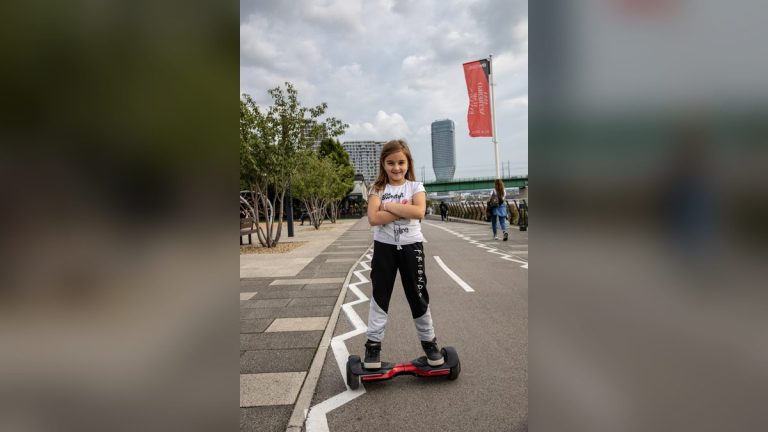
At around 160 pounds of max weight capacity, this board is squarely aimed at children and lighter teens. Hover-1 markets it for ages 8 and up, and that feels right. The build is solid without being heavy, so a child can carry it into the house and set it on the charger without help. The color options, from classic black to pink and swirly galaxy finishes, are clearly chosen to make kids point at the screen and say ‘that one.’
- Great for: kids 8+ and first-time riders learning to balance
- Great for: driveway laps, sidewalks, and smooth indoor floors
- Great for: parents who want a UL-certified board on a budget
- Not ideal for: adults or teens over 160 lbs
- Not ideal for: long commutes, hills, grass, or gravel
| Feature | Details |
|---|---|
| Top speed | 7 mph |
| Motors | Dual 160W (320W combined) |
| Claimed range | Up to 6 miles (about 3-4 miles real-world) |
| Battery | 36V / 2.0 Ah lithium-ion |
| Charge time | About 6 hours |
| Wheels | 6.5″ solid (non-pneumatic) LED wheels |
| Max rider weight | 160 lbs |
| Recommended age | 8 and up |
| Max incline | About 8 degrees |
| Extras | Bluetooth speaker, LED headlights, on-board rider modes |
| Safety | UL 2272 certified |
| Typical price | About $98-$150 |
Hover-1 i-200 Specs and What They Actually Mean
Specs on a box only tell half the story, so let’s translate them. The i-200 runs two 160-watt motors, one in each wheel, for a combined 320 watts. That is plenty to move a child at a steady clip, but it is modest, which is exactly why it tops out at a gentle 7 mph. The wheels are 6.5-inch solid rubber, not air-filled, so you never get a flat, but you also feel small cracks and bumps more than you would on a bigger board.
The heart of the board is a 36V / 2.0 Ah lithium-ion battery. That is a small pack, and it is the single most important number to understand. It powers the ‘up to 6 miles’ range claim, the roughly 6-hour charge time, and the light overall weight. A smaller battery keeps the price and the heft down, which is great for kids, but it also means real-world range lands lower than the sticker. We will dig into that in a minute.
Speed you can trust
7 mph sounds slow until a 60-pound kid is doing it. It is fast enough to feel exciting and slow enough that a tumble is usually just a scrape, not a trip to urgent care.
Wheels and terrain
The 6.5-inch solid wheels shine on smooth, dry surfaces. Keep expectations low for grass, gravel, or thick sidewalk cracks, where the board bogs down and the ride gets jittery.
Weight and portability
Light enough for a child to carry, the i-200 is easy to haul inside for charging or toss in a car trunk for a trip to the park.
How the Hover-1 i-200 Rides
The first thing new riders notice is how forgiving the i-200 feels. It uses step-on mat sensors and self-balancing, so once both feet are planted, the board does the hard work of staying upright. Your rider just leans gently, forward to go, back to stop, and tilts a foot to turn. It clicks faster than most parents expect, often within the first hour.
Hover-1 builds rider modes right into the board, from beginner to expert. Beginner mode softens how sharply the board reacts, which keeps new riders from over-correcting into the classic arms-out wobble. As confidence grows, you bump it up to a more responsive setting. This is a genuinely smart feature on a budget board, because the same hoverboard can grow from a nervous first ride to zippy driveway laps.
That said, this is a beginner board and it rides like one. The lower power means it can struggle on inclines steeper than about 8 degrees, and heavier riders will feel it slow down and drain faster. On smooth pavement with a light rider, though, it is smooth, responsive, and honestly a lot of fun. Owners most often praise the balance of quick-enough reactions without the twitchiness that scares beginners.
Battery, Range, and Charging: The Honest Numbers
Here is where I want to be straight with you. Hover-1 lists the i-200 at ‘up to 6 miles’ per charge, but that number assumes a light rider, flat ground, warm weather, and a slow pace. In normal use, most families see closer to 3 to 4 miles. That small 36V / 2.0 Ah battery simply does not hold as much energy as the packs in bigger boards, so plan around the lower figure and you will not be disappointed.
Charging takes about 6 hours from empty, which is on the slower side. The upside is that kids rarely ride for hours straight, so an overnight or after-school charge usually keeps up with demand. A few real owners have flagged batteries that weakened or would not hold a charge over time. Those cases seem to be the minority, but they are a good reminder to buy from a seller with an easy return window.
- Ride on smooth, flat pavement to stretch every mile
- Keep the board and battery at room temperature; cold cuts range fast
- Top off the charge before longer outings instead of riding on a half-empty pack
- Unplug once the indicator turns green to protect long-term battery health
Lights, Bluetooth Speaker, and the Fun Factor
Let’s be honest about why kids actually want this board: it looks and sounds cool. The i-200’s headline feature is its ‘infinity’ LED wheels, which use a mirrored effect to create a tunnel of glowing light that spins as the board moves. Add LED headlights up front, and the whole thing turns into a little light show at dusk. For a lot of kids, this is the entire selling point, and it genuinely delivers.
Then there is the built-in Bluetooth speaker. Your child pairs a phone, picks ‘i-200’ from the Bluetooth menu, and suddenly they have got a rolling boombox. The sound quality is what you would expect from a small hoverboard speaker, fine for a driveway, not a house party, but kids love it. It turns a simple ride around the block into their own little parade, and that novelty keeps them riding and practicing longer.
None of this makes the board faster or longer-range, but the fun factor matters more than spec sheets admit. A hoverboard that a kid is excited to ride is one that actually gets used, gets them outside, and helps them build balance and coordination. On that measure, the flashy lights and speaker are doing real work, not just showing off. It is a big part of why the i-200 keeps landing on wish lists.
Is the Hover-1 i-200 Safe? UL 2272 and Parent Peace of Mind
Safety is the first thing most parents ask about, and the good news is that the i-200 is UL 2272 certified. That is the exact safety standard created after the hoverboard fire scares of years past. It means the board’s whole electrical system, battery, charger, and wiring has passed strict fire and shock testing. It is the single most important box to tick when buying any hoverboard, and the i-200 checks it.
Certification handles the board’s electronics, but the rest of safety is on you and your rider. A properly fitted helmet is non-negotiable, and wrist guards plus knee pads turn scary-looking spills into no-big-deal moments. Set those rules before the first ride, because it is much harder to add them after a kid has tasted freedom. The gentle 7 mph top speed helps too, keeping falls at a low, manageable speed.
- Always ride with a helmet; add wrist guards and knee pads for beginners
- Keep first rides on smooth, dry, traffic-free surfaces
- Supervise young riders, especially during the first week
- Charge on a hard surface, in view, and unplug when full
Hover-1 i-200 vs the Competition: Is It Worth It?
So where does the i-200 land against its siblings? Inside the Hover-1 family, it sits between the bare-bones Drive and the longer-range i-100. If your rider is light, sticks to short rides, and loves the light show, the i-200 is a sweet spot. If you want more range or a board that can carry a heavier teen or adult, the i-100 and its 10-mile claim and 220-pound limit are the better buy for not much more money.
Against the wider market of budget kids’ hoverboards, the i-200 competes mostly on looks, brand trust, and that UL certification. Plenty of no-name boards undercut it on price, but Hover-1 is a known brand with real support and easy-to-find parts, which counts for a lot when a charger dies or a wheel needs help. Just go in knowing this is a starter board, priced and built like one.
The verdict? For its intended job, a fun, safe, affordable first hoverboard for a child, the Hover-1 i-200 is an easy recommendation. Buy it for a light rider who wants flashy laps around the neighborhood, and it delivers grins for the money. Skip it if you need real range, hill-climbing power, or adult-sized capacity, and size up to the i-100 or a bigger board instead.
| Model | Top Speed | Claimed Range | Weight Limit | Typical Price |
|---|---|---|---|---|
| Hover-1 i-200 | 7 mph | Up to 6 miles | 160 lbs | $98-$150 |
| Hover-1 i-100 | 7 mph | Up to 10 miles | 220 lbs | $150-$180 |
| Hover-1 Drive | 7 mph | Up to 3 miles | 160 lbs | $78-$100 |
| Hover-1 Astro | 7 mph | Up to 6 miles | 220 lbs | $120-$160 |
| Scenario | Realistic Range | Notes |
|---|---|---|
| Light kid (60-90 lbs), smooth pavement | 4-5 miles | Closest you’ll get to the 6-mile claim |
| Heavier teen (120-160 lbs) | 2.5-3.5 miles | More motor load drains the pack faster |
| Cold weather (under 50F) | Cut 20-30% | Lithium batteries lose range in the cold |
| Hills and rough ground | 2-3 miles | 8-degree incline limit; drains quickly |
| Expert mode, full speed | Shorter | Higher speed eats the battery faster |
Common Mistakes (and How to Fix Them)
Fix: The i-200 tops out at 7 mph with a small 2.0 Ah battery. If you want a board for a heavier teen or longer rides, step up to the i-100 or a bigger model instead of being let down.
Fix: Charge the board fully (about 6 hours) before the first ride. Letting the battery settle in with a proper first charge helps it hold power and last longer over time.
Fix: Those 6.5-inch solid wheels are made for smooth, dry pavement. Keep the board off grass, gravel, and puddles to avoid slips and water damage to the electronics.
Fix: A helmet is non-negotiable, and wrist guards and knee pads make the learning falls painless. Set the rule before the first ride, not after the first tumble.
Pro Tips
- 💡 Start in beginner mode. It softens the board’s responses so new riders don’t over-correct and wobble.
- 💡 Have your child mount near a wall or a helping hand. Step on one foot at a time and let the self-balancing kick in before moving.
- 💡 Store and charge indoors at room temperature. Cold garages sap lithium batteries and cut your range.
- 💡 Wipe the board and wheels down after each ride. Grit in the wheel wells is the number one thing that makes a board feel rough over time.
- 💡 Unplug the charger once it turns green. Leaving it plugged in for hours after it’s full slowly wears the battery down.
A Real-Life Example
My neighbor grabbed the i-200 for her nine-year-old’s birthday, mostly because of the color-shifting wheels. Within an afternoon he was cruising up and down the driveway, blasting music from the built-in speaker like he owned the block. She told me the learning curve was gentler than she expected, and beginner mode kept the first few wobbles from turning into wipeouts.
The honest trade-off showed up a week later. On a longer trip to a friend’s house and back, the battery tapped out sooner than the 6-mile sticker promised, closer to three and a half miles. For driveway laps and short neighborhood spins, though, it has been a hit, and at its price she is not complaining one bit.
Frequently Asked Questions
Yes, the i-200 is one of the most beginner-friendly hoverboards Hover-1 makes. Its gentle 7 mph top speed, easy self-balancing, and dedicated beginner riding mode are all designed to help first-timers and kids learn without getting overwhelmed. Most new riders find their balance within the first hour on smooth, flat ground, which makes it a confidence-builder rather than a scary machine.
The Hover-1 i-200 supports riders up to 160 pounds. That makes it a great fit for kids and lighter teens, but heavier riders should look at the i-100 (220 lbs) or a larger board. Hover-1 kids’ boards also work best with a minimum rider of around 44 pounds, so the sensors read weight correctly and the board balances the way it should.
Hover-1 claims up to 6 miles, but in the real world expect closer to 3 to 4 miles. A lighter child riding on smooth, flat pavement in warm weather will get near the top figure, while a heavier rider, hills, or cold temperatures will cut it down. The small 36V / 2.0 Ah battery is the limiting factor, so plan around the lower number.
A full charge takes about 6 hours, which is on the slower side. It is easiest to charge it overnight or while your child is at school so it’s ready when they are. Always unplug it once the light turns green, and charge it on a hard surface in view rather than unattended on carpet or a bed.
Yes, the i-200 is UL 2272 certified, which is the safety standard for a hoverboard’s electrical and battery system. That certification means it has passed strict fire and shock testing, the exact thing that caused the old hoverboard scares. Pair it with a helmet and pads and supervise young riders, since certification covers the electronics, not crash protection.
Not really. The i-200’s Bluetooth connection is used mainly for its built-in speaker, and its beginner-to-expert rider modes are controlled right on the board rather than through a phone app. That keeps things simple for kids. If you specifically want app control, Hover-1’s i-100 is the app-enabled model in the same family.
Final Checklist ✅
- ✅ Confirm the rider fits the range, roughly 44 to 160 lbs and age 8 or older
- ✅ Fully charge the board (about 6 hours) before the first ride
- ✅ Buy a properly fitted helmet, plus wrist guards and knee pads
- ✅ Pick a smooth, flat, dry, traffic-free surface for the first few sessions
- ✅ Set the board to beginner mode before your rider steps on
- ✅ Check the listing says UL 2272 certified and the charger is included
- ✅ Plan to store and charge the board indoors at room temperature