Every hoverboard talks to you with a handful of small lights, and almost nobody is told what they mean. A solid red is not the same as a flashing red; a green charger light can mean “full” or “not charging at all”; a flashing blue light is nothing to worry about. This guide decodes each light, in the order you are most likely to meet it, and tells you what to do next. Patterns vary a little between brands, so where a manual exists, it wins.
This article is part of our hoverboard troubleshooting hub, which covers every common fault, from charging to calibration.
The lights on a hoverboard and where they are
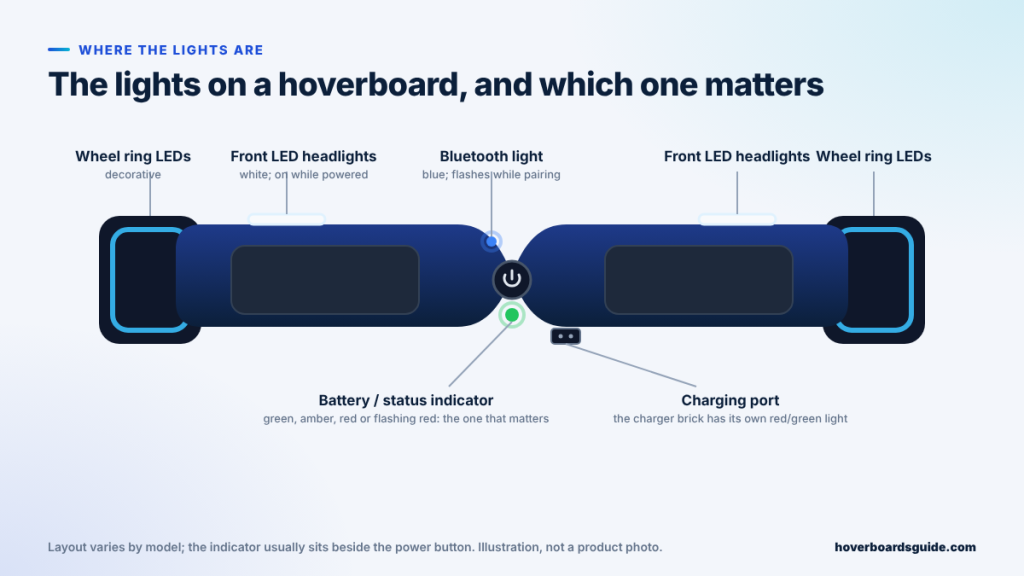
A typical self-balancing board has a power button in the middle with a small indicator light beside it, a Bluetooth light on models with a speaker, white LED headlights on the front edge of each foot platform, decorative LEDs in or around the wheels, and a charging port near the rear edge. The charger brick that plugs into the wall has its own red and green light. The headlights and wheel LEDs look dramatic but say nothing about the board’s health. The indicator and the charger light are the two that carry information, and the rest of this guide is mostly about them. If you want to know what the sensors behind the lights are doing, our explainer on how a hoverboard works covers the gyroscopes and the logic board.


Battery indicator colours: green, amber and red
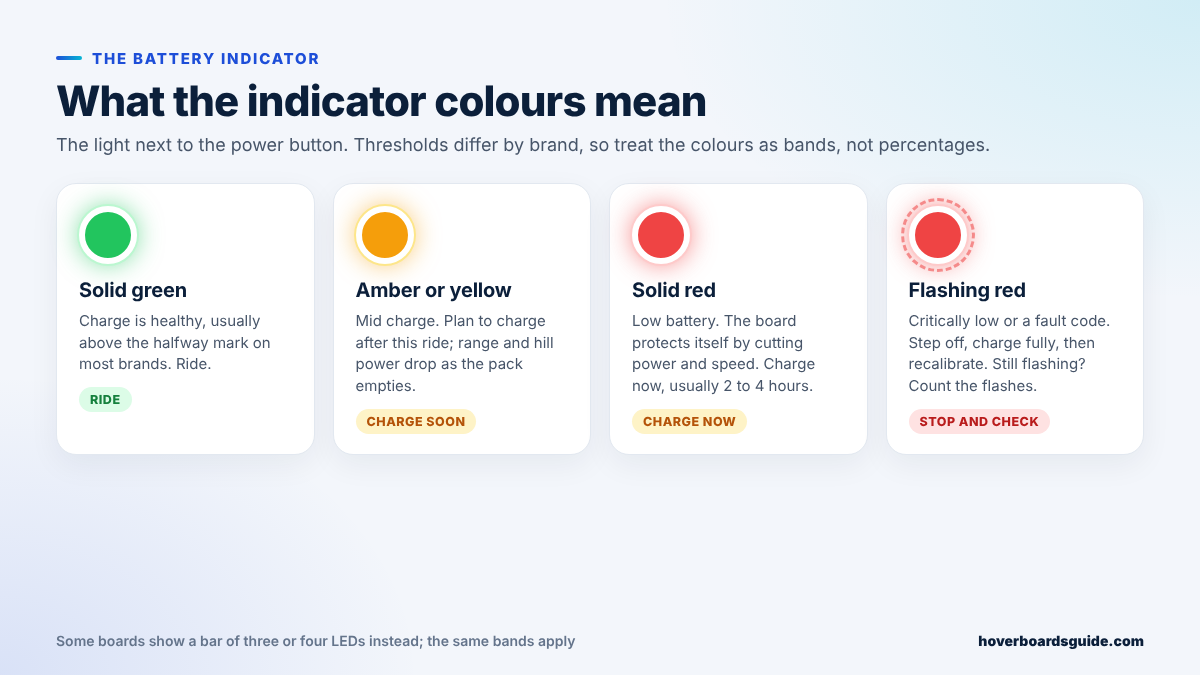
The indicator next to the power button is a battery gauge first and a fault light second. Solid green means the pack is healthy, usually above the halfway mark on most brands. Amber or yellow is the middle band; the board still rides normally but you will notice less punch on hills, and it is time to plan a charge. Solid red is low battery. Many boards also cut top speed and lean the platform back slightly at this point to make you slow down, which riders sometimes mistake for a fault. It is the board protecting its cells. Charge it, which takes two to four hours on most packs, and the light returns to green. Some boards replace the single light with a bar of three or four LEDs; the same bands apply, with the last LED standing in for red.
The thresholds are not standardised. One brand switches to red at roughly 20 percent, another at 10, and a board with an ageing battery will drop from green to red faster than it used to because its usable capacity has shrunk. Our battery-life guide explains what to expect as a pack ages.
Red light flashing: the six usual causes
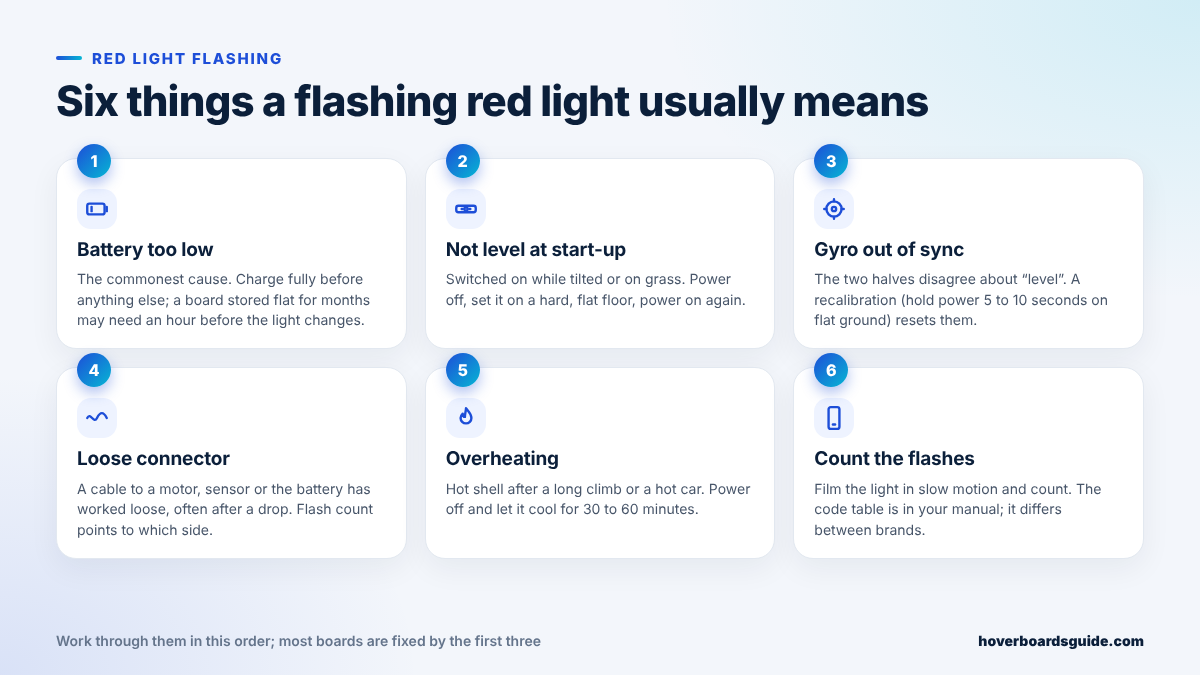
A flashing red light means the board has stopped trusting itself. Work through these in order; most boards are back on the road by the third step.
- The battery is too low to balance. The commonest cause by a wide margin. Plug it in and leave it. A board that has sat flat for months may show nothing for the first hour, then start charging normally.
- It was switched on while not level. Boards calibrate “level” at power-on. Turn one on while it is tilted, on grass, or with one foot already on it, and it flags an error. Power off, set it on a hard flat floor, power on again.
- The two halves disagree. Each side has its own gyroscope and the logic board compares them. After a drop, a bump, or a long time in storage they can drift apart. A recalibration resets them in under a minute.
- A connector has worked loose. Cables run from the logic board to each motor, each sensor pad and the battery. A hard knock can loosen one, and the board reports it as a flash code. On many models the number of flashes points to which side has the problem.
- It is overheating. A long climb, a heavy rider, or an afternoon in a hot car. The shell feels warm and the light flashes. Power off and let it cool for 30 to 60 minutes in the shade before trying again.
- A genuine component fault. A motor, a sensor pad, the battery’s protection board or the logic board itself. This is the one you cannot fix with a button, and the flash count is how you find out which.
Red light with beeping
Beeps and lights are usually the same message delivered twice. A short beep on power-up is normal. Steady beeping with a solid red light is almost always low battery or an un-level start. A long, continuous beep with a flashing red light is the board telling you not to ride it: it has detected a fault it cannot work around. Step off, charge it fully, recalibrate, and if the pattern returns, treat it as a component fault. Why is my hoverboard beeping? goes through every beep pattern in the same way this guide goes through lights.

Charger light meanings
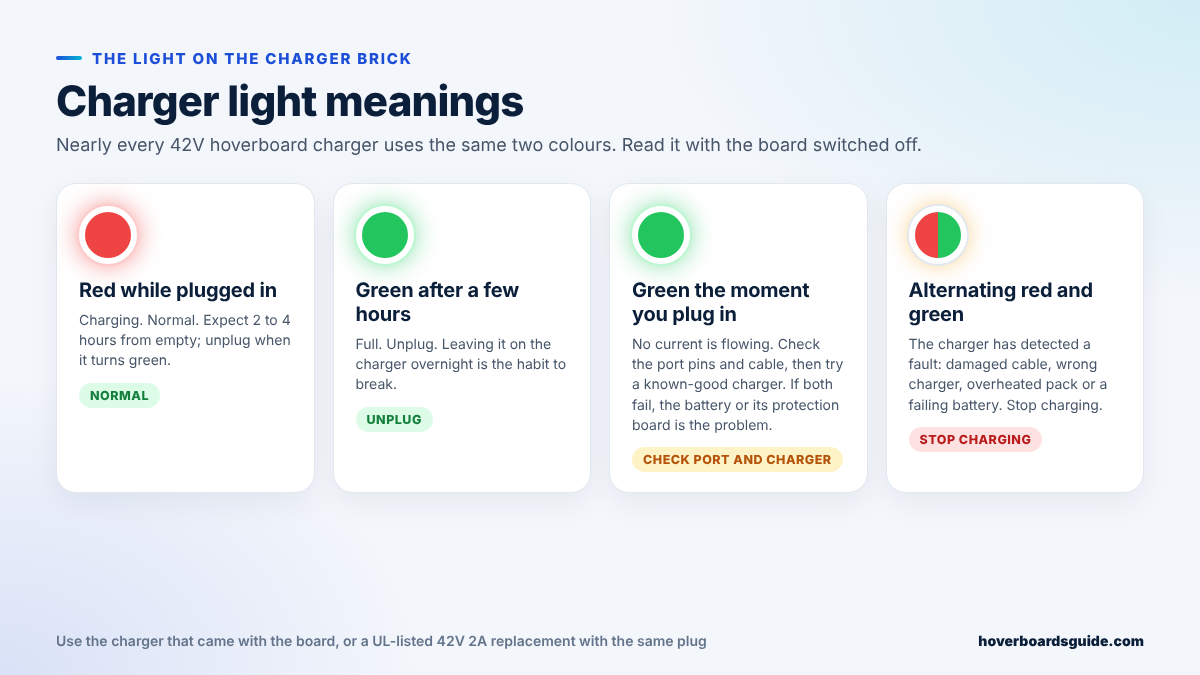
Nearly every hoverboard charger is a 42-volt brick with one two-colour LED, and the logic is the same across brands. Red means current is flowing into the battery: normal, and it should stay red for two to four hours from empty. Green after a few hours means the pack is full. Unplug it; leaving a board on the charger overnight is the single habit most worth breaking. Green the moment you plug in a board you know is flat is the one that catches people out. It does not mean the board is full; it means no current is flowing. Look into the charging port with a torch for bent or dirty pins, check the cable and plug for damage, and try a known-good charger if you can borrow one. If a good charger still shows instant green, the battery or its protection board has shut down, and the next stop is a battery replacement. Alternating red and green is a fault signal from the charger itself: a damaged cable, the wrong charger, an overheated pack or a failing cell. Stop charging and do not try again until you have found the cause.
Always use the charger that came with the board, or a UL-listed 42V 2A replacement with the same plug. A charger with the right plug but the wrong voltage is the classic way to damage a pack; our charger guide explains how to read the label.
Blue and white lights: Bluetooth, headlights and wheel LEDs
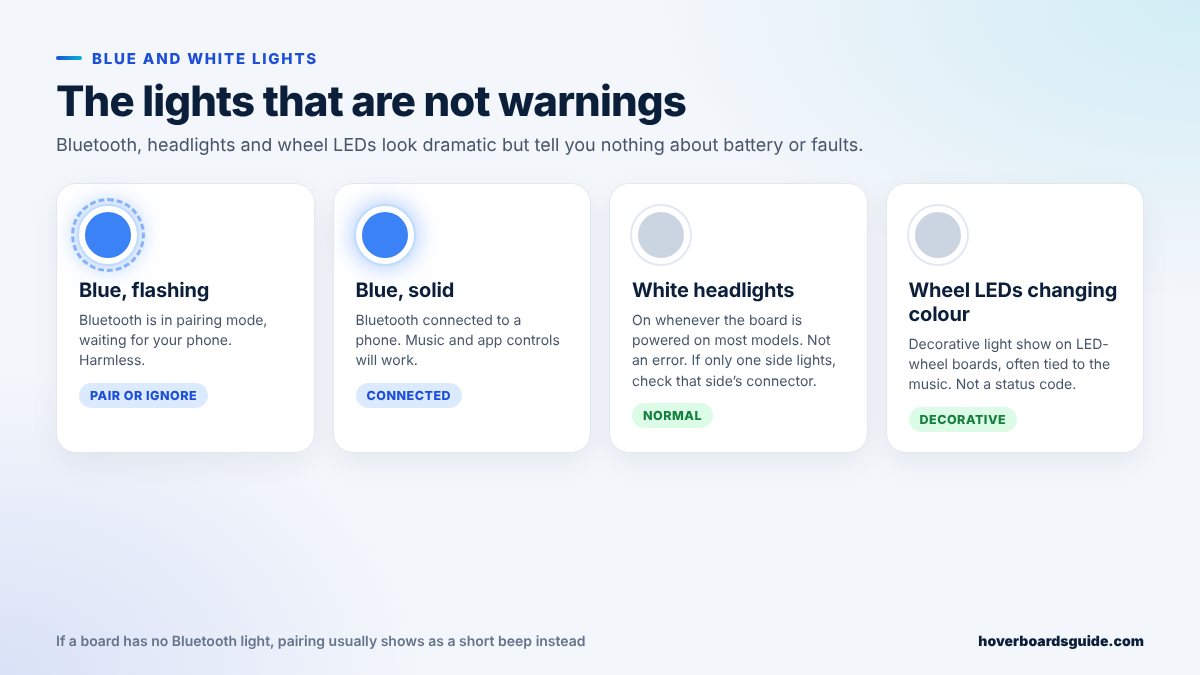
A flashing blue light means the Bluetooth speaker is in pairing mode and waiting for a phone. It flashes every time you power on a board that has not been paired, and it is harmless. Solid blue means a phone is connected. The white headlights on the front edge come on whenever the board is powered on most models; if only one side lights, that side’s connector is the first thing to check, but the board will ride normally. Colour-changing wheel LEDs are decoration, often pulsing with the music, and carry no status information at all. If your board has an app, it can usually turn the light show off; here is which boards have one.

Lights on but the board will not move: recalibrate
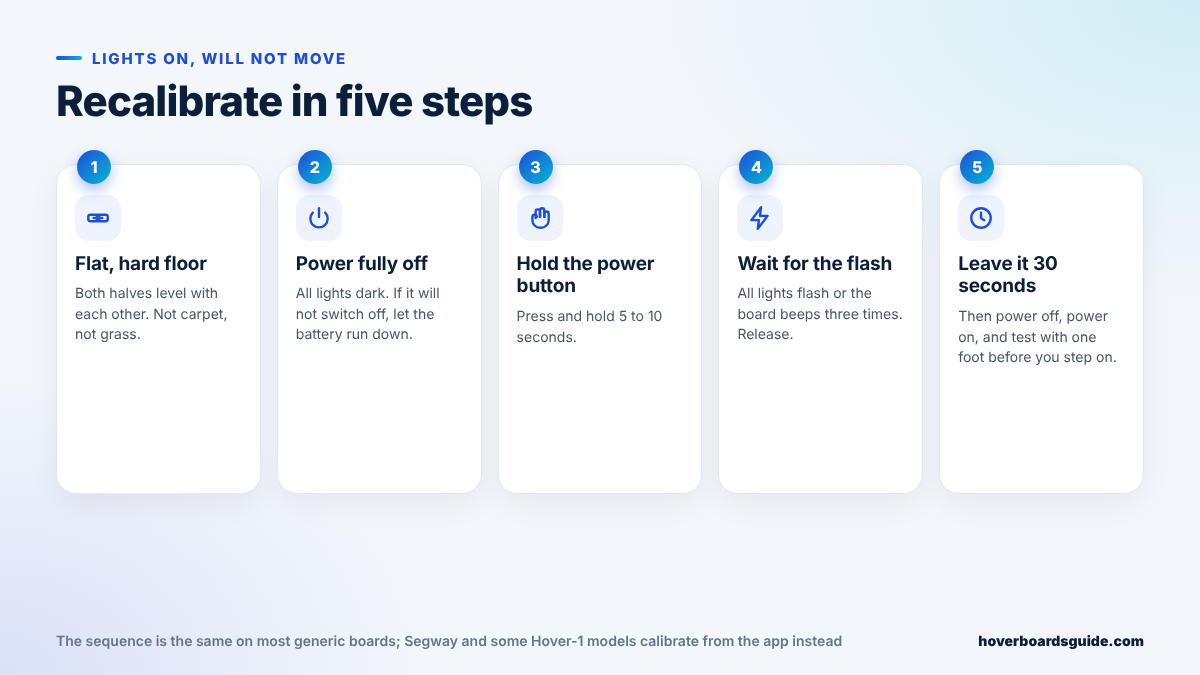
If the lights come on, the battery shows green, but the platforms will not level or the board beeps as soon as you step on, the gyroscopes need resetting. On most generic boards the sequence is the same:
- Put the board on a flat, hard floor with both halves level with each other. Not carpet, not grass, not a sloping drive.
- Power it fully off so every light is dark. If a board refuses to switch off, this is why and what to do.
- Press and hold the power button for five to ten seconds.
- Wait for the signal: all the lights flash together, or the board beeps three times. Let go of the button.
- Leave it for thirty seconds, power off, power on, and test with one foot before you commit your weight.
Segway and some Hover-1 models calibrate from their app instead of the button, and a few boards use a hidden reset button under the shell. Our full reset and calibration guide covers those variations. If the board calibrates but one side still shakes or drifts, read why a hoverboard shakes; if it ignores one foot, the pressure sensor under that pad is the usual suspect.
No lights at all
A board that shows nothing when you press the power button has one of four problems, in order of likelihood: a battery run completely flat, a charger that is not charging it (check the charger light as above), a power button that has failed, or a wiring or logic-board fault inside. Charge it for an hour and try again before assuming the worst. A board that powers on and then dies mid-ride is a different problem; this guide covers the random shut-off. And if the board is new and the lights behave nothing like the manual, check that it is the model you paid for.

When a light means stop riding
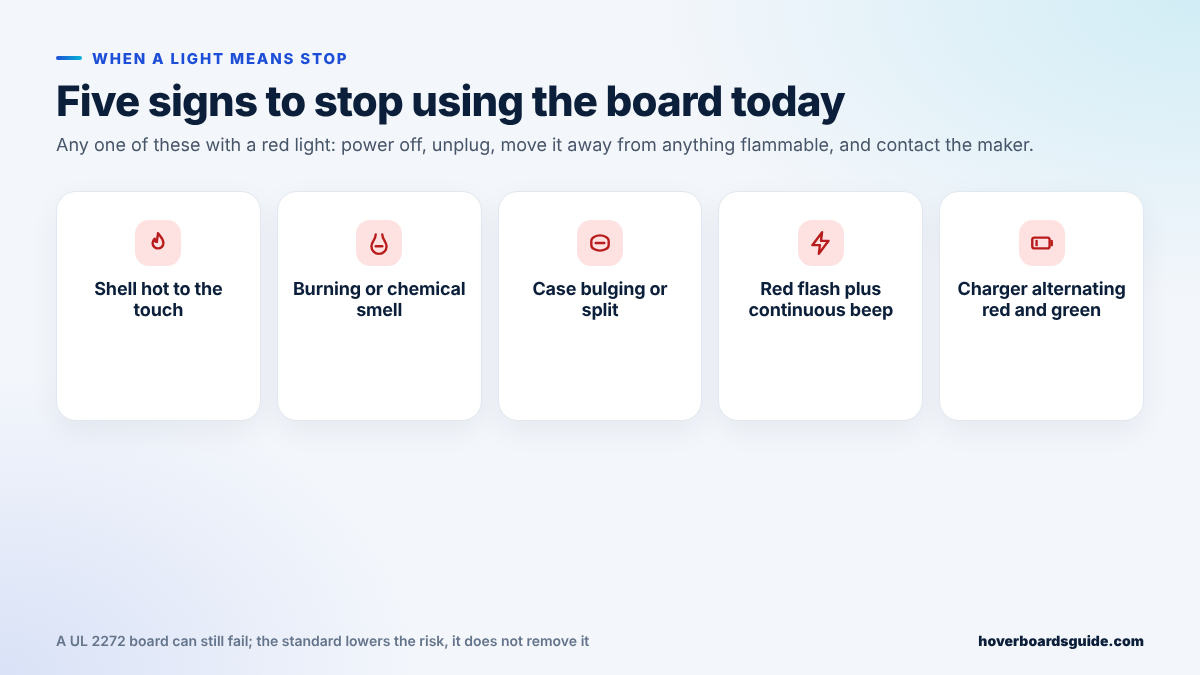
Lights are warnings, not emergencies, with five exceptions. A red light together with a shell that is hot to the touch, a burning or chemical smell, a case that is bulging or split, a continuous beep that calibration does not clear, or a charger alternating red and green: any one of these means power off, unplug, move the board away from anything flammable and contact the manufacturer. Do not keep charging to “see if it sorts itself out”. UL 2272 certification makes these failures rare, not impossible; here is where the fire risk actually stands today.
Quick reference
| Light | Most likely meaning | What to do |
|---|---|---|
| Solid green indicator | Battery healthy | Ride |
| Amber or yellow indicator | Mid charge | Charge after this ride |
| Solid red indicator | Low battery; board limiting speed | Charge, 2 to 4 hours |
| Flashing red indicator | Critically low, un-level start, or a fault code | Charge fully, recalibrate, then count the flashes |
| Red plus continuous beep | Fault the board cannot work around | Stop riding; charge, recalibrate, then service |
| Charger red | Charging | Wait; unplug at green |
| Charger green after hours | Full | Unplug |
| Charger green immediately | Not charging | Check port pins, cable, try another charger |
| Charger alternating red/green | Charging fault | Stop charging; find the cause |
| Flashing blue | Bluetooth pairing | Pair your phone or ignore |
| Solid blue | Bluetooth connected | Nothing |
| White headlights | Powered on | Nothing; one side dark means a loose connector |
| No lights | Flat battery, charger, button or wiring | Charge an hour, then check the charger light |

Frequently asked questions
Why is my hoverboard flashing red and not moving?
Most often the battery is too low to balance, or the board was switched on while tilted. Charge it fully on a flat floor, then recalibrate by holding the power button for five to ten seconds. If the red flash returns, count the flashes and match them to the code table in your manual.
What does a green light on the hoverboard charger mean?
After a few hours of red, green means the battery is full and you should unplug. Green the instant you plug in a flat board means no current is flowing: check the charging port, the cable and the charger before suspecting the battery.
How long does it take for the light to turn green?
Two to four hours from empty on most boards. A pack that has been stored flat for months may show nothing for the first hour; an old pack takes longer than it did when new.
What does the blue light on a hoverboard mean?
Bluetooth. Flashing blue is pairing mode; solid blue means a phone is connected. It has nothing to do with battery level or faults.
Do the flashing lights on hoverboard wheels mean anything?
No. Wheel LEDs and the front headlights are decoration or visibility lights. The only status light is the small indicator beside the power button, plus the light on the charger brick.
My hoverboard shows a red light even after charging. Is it broken?
Not necessarily. Recalibrate first, then try a different charger if the charger light went green immediately. If a good charger and a calibration do not clear it, the battery or a connector is the likely fault, and the flash count tells you which.
Light patterns in this guide are the common behaviour across the brands we cover; your manual is authoritative for your model. Nothing here replaces the manufacturer’s safety instructions. If you are unsure whether a board is safe to charge, stop and ask the maker.