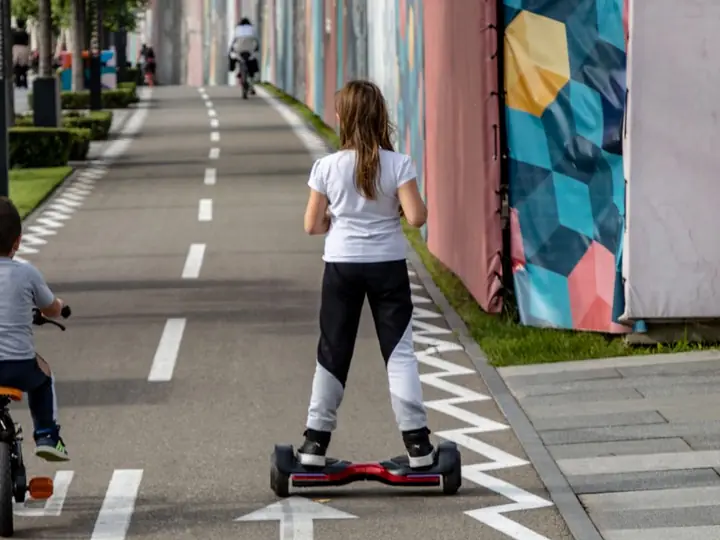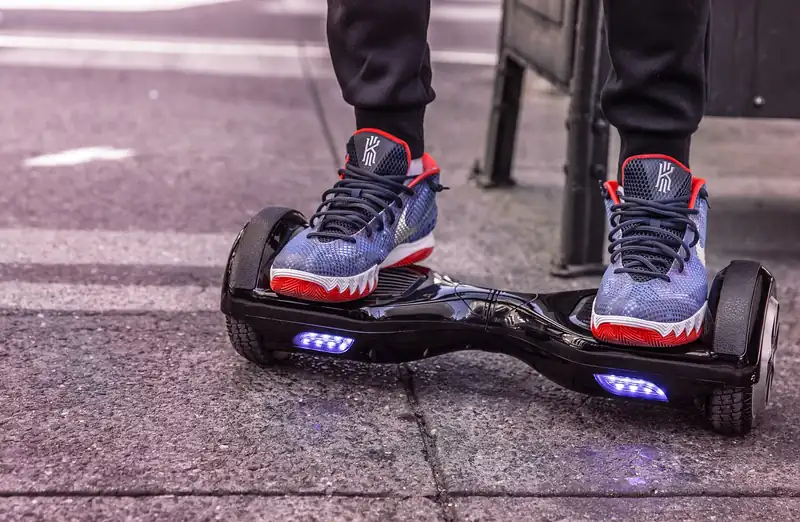
Real reviews, real specs, and honest picks for kids and adults – so you buy the right board the first time.
Welcome! If you have been hunting for the best hoverboard reviews, you have landed in the right spot. A hoverboard is a simple, joyful way to zip around the driveway, the sidewalk, or the school parking lot. But shopping for one can feel like a headache. There are dozens of brands, prices that swing from $90 to $600, and a pile of look-alike models that ride nothing alike.
We spend a lot of time with two-wheeled toys and rides here, and we have watched it all. Cheap boards that wobble on day one. Batteries that die after a month. And a small handful of models that just work: safe power, smooth balance, and enough grip to be fun on grass or gravel. This guide sorts the winners from the duds in plain English.
Here is the short version. For most people, an 8.5-inch all-terrain board like the Gyroor Warrior G2 hits the sweet spot of price, power, and grip. Young kids on smooth pavement do great on a 6.5-inch budget board. And if you want the very best, the Segway Ninebot S is the gold standard. Keep reading for the full breakdown, honest specs, and the safety stuff nobody should skip.
How We Chose the Best Hoverboards
Not every board that looks the same actually rides the same. Two boards can share the same photo on a listing and feel like totally different machines under your feet. So we judge every hoverboard on five things: safety, balance quality, power and range, build quality, and value. Safety always comes first. A board that overheats is not a bargain at any price.
The single most important thing to check is the UL 2272 mark. It means the battery, charger, motors, and logic board were all tested together as one complete system, not just the parts on their own. Every board on this page has it. After that, we look at how quickly a board self-levels when you step on, how it takes a curb, and whether the motors stall on a gentle hill.
Then we weigh the boring stuff that actually shapes your day. Real-world range (almost always less than the box claims), charge time, weight limit, and how the board holds up after a few hundred rides. Finally, we look at price against who it is for. A great $120 board can beat a so-so $300 one for a light young rider. The best hoverboard is the one that fits your rider, your ground, and your wallet.
- Safety first: verified UL 2272 certification on the battery, charger, and board
- Balance feel: how fast and smoothly the board levels out under a new rider
- Power and range: motor watts, hill-climbing, and honest miles per charge
- Build quality: frame material, tire type, water resistance, and durability
- Value: real price versus who the board is actually built for
| Model | Best For | Wheels | Top Speed | Range | Max Load | Price |
|---|---|---|---|---|---|---|
| Gyroor Warrior G2 | All-terrain value | 8.5 in solid | Up to 10 mph | 7.5-9.5 mi | 265 lbs | ~$300 |
| Segway Ninebot S | Premium / commuting | 10.5 in air | ~10 mph | ~13.7 mi | 220 lbs | ~$550 |
| Hover-1 Titan | Comfort, big tires | 10 in air | ~8 mph | ~8 mi | 265 lbs | ~$250 |
| Gotrax Edge | Kids / budget | 6.5 in solid | 6.2 mph | ~2.5 mi | 176 lbs | ~$100 |
| Tomoloo | Lights & music | 6.5 in solid | ~7.5 mph | ~7.5 mi | 220 lbs | ~$130 |
The Best Hoverboards for 2026
Below are our favorite boards for the year, sorted by who they are for. Prices bounce around a lot with sales, so treat the numbers as a ballpark and grab a deal when you see one. We stuck to brands with a real track record, real reviews, and proper safety certification. No mystery no-name boards made the cut.
One quick note: the fastest or longest-range board is not automatically the best board for you. A 6-mph board with small wheels can be the perfect first ride for an eight-year-old, while a heavier adult will be far happier on 10-inch tires. Match the pick to the rider.
Best Overall Value – Gyroor Warrior G2
This is the board we hand to most people. Its 8.5-inch solid rubber tires roll over grass, gravel, and wet pavement, and they never go flat. Dual 350W motors (700W total) climb surprisingly steep hills, and a beginner mode keeps new riders calm. It charges in about two hours and carries up to 265 pounds. At around $300 on sale, it does almost everything well.
Best Premium – Segway Ninebot S
If money is no object, this is the one. Big 10.5-inch pneumatic tires soak up cracks and bumps, the dual 800W motors feel effortless, and range stretches to roughly 13.7 miles. A knee-control bar adds precise steering, and the app is genuinely useful. It is heavy and costs about $550, but the build quality and smooth ride are in a different league.
Best Big-Wheel Comfort – Hover-1 Titan
Taller and heavier riders love the Titan. Its 10-inch air-filled tires and long deck give a planted, stable feel that small boards cannot match. You get around 8 mph, an 8-mile range, three rider modes, and a Bluetooth speaker. It holds up to 265 pounds and usually sells near $250, making it a comfortable pick for adults.
Best Budget and First Board – Gotrax Edge
For a young rider or a first-timer on smooth ground, the Edge is hard to beat near $100. It keeps things simple: 6.5-inch tires, a gentle 6.2 mph top speed, and a 44-to-176-pound weight range that suits kids. Range is short at about 2.5 miles, but that is plenty for driveway laps, and it is UL 2272 certified.
Best for Lights and Music – Tomoloo
Some riders just want the show, and Tomoloo delivers. Bright RGB LED wheels, glowing side lights, and a solid Bluetooth speaker make it a party on two wheels. Under the flash it is a sensible 6.5-inch board with UL 2272 and UL 2271 certification, a modest top speed, and an approachable price around $130. It is a great pick for tweens and teens.
Wheel Sizes: 6.5, 8.5, or 10 Inch?
Wheel size is the choice that changes your ride the most, and it is the one shoppers get wrong most often. Bigger wheels are not always better. They are heavier, cost more, and can feel like too much board for a small kid. The trick is matching the wheel to the rider and the ground.
6.5-inch wheels are the classic size. They are light, easy to carry, and perfect for kids and casual adults cruising smooth sidewalks, garages, and gym floors. The catch is that a small pebble or sidewalk crack can stop them cold, so they are strictly a smooth-surface tool.
8.5-inch tires are the all-rounder. They add grip and ground clearance, so you can roll onto grass, packed dirt, and gravel without getting stuck. They are the size we recommend for most teens and adults who want to have real fun without hauling a heavy machine. 10-inch tires are the off-road champs. They are usually air-filled, so they cushion bumps beautifully and stay stable on rough paths. The trade-off is weight and price, but for a bigger rider or a true trail explorer, nothing else feels as smooth.
What to Look For Before You Buy
Once you have picked a wheel size, a few specs separate a board you will love from one you will regret. Start with the weight limit, and take it seriously on both ends. Go over the maximum and the motors strain, the range drops, and hills feel impossible. Go under the minimum (often about 44 pounds) and the sensors may not even notice a light child, which makes the board wobble in a scary way.
Next, look at motor power and range together. More watts mean better hill-climbing and quicker pickup, while range tells you how far you really get per charge. Always assume real range is a bit less than the listing claims, especially with a heavier rider or on hills. Then check the extras that make a board nicer to live with: a decent Bluetooth speaker, LED lights for evening rides, an app, and water resistance (an IP54 rating shrugs off light splashes and dust).
Above all, buy from a seller with a real return policy and read recent reviews, not just the star average. If a listing has no UL 2272 mark, a suspiciously low price, and a brand you cannot find anywhere else, walk away. That combination is the classic profile of a board that is not worth the risk.
- Weight limit: stay inside both the maximum and the minimum for a safe, stable ride
- Motor and range: match watts and miles to your hills and how far you want to go
- Tire type: solid tires never go flat; pneumatic tires ride softer on bumps
- Extras: Bluetooth, LED lights, an app, and an IP54 water-resistance rating
- Seller trust: easy returns, recent real reviews, and a brand you can look up
Staying Safe and Making the Battery Last
A UL 2272 board is very safe when you treat it right, and a few simple habits keep it that way for years. Most of them come down to how you charge and store the battery. Lithium batteries do not like extreme heat, deep drains, or being left plugged in for days. Respect those three things and yours will stay healthy.
Always use the exact charger that came with your board, and unplug it as soon as it is full, usually in two to three hours. Do not charge overnight or leave it plugged in on the counter for a week. Let the board cool down for a bit after a long ride before you plug it in, since a hot battery does not like a fresh charge. If you are storing it for the season, park it at roughly 40 to 80 percent charge in a cool, dry spot, and top it up every couple of months.
On the riding side, gear up. A helmet is non-negotiable, and wrist guards plus knee pads save a lot of tears during the first week. Break in on a flat, soft surface like a carpet or short grass while holding a wall or a helper’s hand. And keep an eye on the board itself: if you ever notice a swollen case, a strange smell, or a battery that gets very hot, stop using it and contact the maker.
- Use only the original charger and unplug the moment the board is full
- Let the board cool after riding before you plug it in to charge
- Store long-term at 40 to 80 percent in a cool, dry place; top up every few months
- Always wear a helmet; add wrist guards and knee pads for beginners
- Stop riding if you see swelling, smell burning, or feel unusual heat

How Much Should You Spend?
You do not need to spend a fortune to get a safe, fun hoverboard, but spending a little more does buy real improvements. The jump from a bargain board to a mid-range one usually gets you bigger tires, more power, and a longer range, which matters a lot once a rider outgrows driveway laps.
Under $150 gets you a solid entry board with 6.5-inch wheels, a short range, and the basics like Bluetooth and LED lights. That is the right zone for kids and first-timers on smooth ground. The $150-to-$350 range is the sweet spot for most families, unlocking 8.5-inch or 10-inch tires, stronger motors, and enough range for genuine all-terrain fun. Above $350, you are paying for premium build quality, app features, big pneumatic tires, and the kind of range that makes short commutes realistic. Pick the tier that matches how the board will actually be used, not the flashiest one on the shelf.
| Wheel Size | Best Rider | Terrain | Typical Max Load |
|---|---|---|---|
| 6.5 inch | Kids 8+, casual adults | Smooth pavement, indoors | ~180-220 lbs |
| 8.5 inch | Teens 13+, most adults | Grass, gravel, packed dirt | ~265 lbs |
| 10 inch | Bigger teens & adults | Rough paths, real off-road | ~265 lbs |
| Price Range | What You Get | Best For |
|---|---|---|
| Under $150 | 6.5 in wheels, short range, Bluetooth, LED, UL 2272 | Kids, first-timers, smooth ground |
| $150-$350 | 8.5-10 in tires, more power, longer range | All-terrain fun for teens and adults |
| $350+ | 10.5 in tires, app, 13+ mile range, top build | Premium feel, commuting, heavy use |
Common Mistakes (and How to Fix Them)
Fix: Only buy boards that clearly show UL 2272 on the listing and packaging. This is the safety standard that tests the battery, charger, and board as one system. If a seller cannot prove it, skip the board no matter how cheap it is.
Fix: Stay inside the maximum and the minimum. Too heavy and the motors strain and range tanks; too light (under about 44 pounds) and the sensors may not detect the rider, causing violent wobble. Match the board’s rated range to the actual rider.
Fix: Choose 6.5-inch wheels only for smooth pavement, 8.5-inch for grass and gravel, and 10-inch for rough or off-road paths. A tiny 6.5-inch board will stall on a pebble or crack and frustrate an outdoor rider fast.
Fix: Use only the charger that came with the board, and unplug it as soon as it is full. Leaving it plugged in for hours or using a random charger stresses the battery and shortens its life. Let the board cool before charging after a long ride.
Pro Tips
- 💡 Break in on a soft, flat surface like carpet or short grass while holding a wall or a helper’s hand – most first-day falls happen in the first ten minutes.
- 💡 Keep the battery between about 40 and 80 percent for storage, and top it up every couple of months so it never sits fully drained.
- 💡 Wipe the sensors and tires after riding on grass or dust; a little grime on the foot pads can make the board feel twitchy.
- 💡 Always wear a helmet, and add wrist guards and knee pads for new or young riders – wrists take the worst of a fall.
- 💡 Buy from a seller with an easy return window and test the balance and Bluetooth on day one, while you can still send it back.
An Example Scenario
Illustrative example: a composite of situations riders often describe, not a real customer story.
Picture a mixed household: a 10-year-old who wants to ride the backyard and a dad who is a solid 210 pounds. A Gyroor Warrior G2 suits both. On smooth concrete it feels tame in beginner mode, which is exactly what a nervous first-timer needs. The real advantage shows on grass: the 8.5-inch tires roll over a lawn and a gravel side path that would stop a cheaper 6.5-inch board dead.
After three months of near-daily rides, the battery still charges in about two hours and easily covers the loop to the park and back. The habit that helps most: never leave it plugged in overnight, and store it half-charged. No wobble, no drama, no flat tires. For the price on sale, it has been the easiest recommendation we make.
All our hoverboard reviews
Brand comparisons
- Gotrax Hoverboard vs Hover-1
- Gyrocopter vs Gotrax Hoverboard Which is Better
- Hover-1 vs Jetson Hoverboard: Which Brand Is Better?
- Swagtron vs Gotrax Hoverboard: Which to Buy?
Hoverboard reviews
- Airwalk Self-Balancing Scooter Review: The Honest Truth (and Safer Picks)
- Back to the Future Hoverboard: Review & Real Options
- Glyro Hoverboard Review: Is It Worth It in 2026?
- GoTrax Lil Cub Hoverboard Review: Best First Board?
- Gotrax Nova Pro Hoverboard Review: Honest Take
- Hover-1 H1 Hoverboard Review: Is It Worth It?
- Hover-1 Helix Hoverboard Review: Specs & Real Tips
- Hover-1 i-200 Hoverboard Review: A Great First Ride
- Hover-1 Matrix Hoverboard Review: Worth It for Kids?
- Hover-1 Sypher Review: The Smart Hoverboard
- Hover-1 Titan Hoverboard Review: Is It Worth It?
- Hover-1: The Ultimate Hoverboard for Young Riders
- iScooter Hoverboard Review
- LeRay Self-Balancing Hoverboard: Still Worth It?
- MegaWheels Hoverboard Review: Is It Worth Buying?
- SISIGAD Hoverboard Review: Is It Worth Buying?
- Smart Balance Wheel Hoverboard Review: Worth It?
- Street Saw Hoverboard Review
- Swagtron T1 Hoverboard Review: Still Worth It?
- Swagtron T580 Hoverboard Review: Is It Worth It?
- The Hover-1 Ranger Hoverboard Review
- Xiaomi M365 Hoverboard: The Real Buyer’s Guide
More hubs: Hoverboard Buying Guide, Hoverboard Troubleshooting, Hoverboard Safety and Riding.
Frequently Asked Questions
Yes, modern hoverboards are far safer than the early models that made headlines. The key is UL 2272 certification, which tests the battery, charger, and board together as one system. The fires from years ago came from cheap, uncertified boards. Stick to a certified board, use the original charger, and never leave it charging unattended overnight, and the risk is very low.
There is no single best brand, but a few stand out. Segway makes the premium picks like the Ninebot S, Gyroor leads for all-terrain value, and Hover-1 and Gotrax are reliable for comfort and budget rides. Tomoloo and Jetson are popular for lights and music. What matters more than the logo is UL 2272 certification, the right wheel size, and a weight limit that fits your rider.
Most hoverboards top out between 6 and 10 mph. Kids’ and budget boards are usually capped around 6 to 7.5 mph for safety, while all-terrain and premium boards reach 8 to 10 mph. That may not sound fast, but 10 mph feels quick standing on a small board, so beginners should start in a low-speed or beginner mode and work up.
Most makers recommend hoverboards for riders aged 8 and up, and many suggest 13-plus for larger, faster boards. The real limits are weight and balance, not just age. A child needs to be over the minimum weight (often about 44 pounds) for the sensors to work, and any young rider should always wear a helmet and start slow with supervision.
Range depends on the model, the rider’s weight, and the terrain, but most boards cover between 3 and 13 miles per charge. Budget kids’ boards do around 2.5 to 4 miles, all-terrain boards manage 7 to 10 miles, and premium models like the Segway Ninebot S can reach roughly 13 miles. Expect real-world range to run a bit shorter than the listing claims, especially on hills.
Absolutely, as long as you check the weight limit and pick the right wheel size. Most standard boards support up to about 220 pounds, and all-terrain models like the Gyroor Warrior G2 or Hover-1 Titan handle up to 265 pounds. Heavier or taller adults ride most comfortably on 8.5-inch or 10-inch tires, which give a more stable, planted feel than small 6.5-inch wheels.
Final Checklist ✅
- ✅ Confirm the board is clearly UL 2272 certified before you buy
- ✅ Match the wheel size to your ground: 6.5 in for pavement, 8.5 in for mixed terrain, 10 in for off-road
- ✅ Check both the maximum and minimum weight limits against your rider
- ✅ Compare real-world range and charge time, not just the top speed
- ✅ Buy a helmet, and add wrist guards and knee pads for new riders
- ✅ Read recent reviews and confirm the seller has an easy return policy
- ✅ Plan to use the original charger and store the battery at 40-80 percent